FastReply
For accommodation providers who want to collect consent during online check-in and find it in the guest record.
Connection available; configuration required.
Check-in and consent →
SIGNATURE AND YOUR SOFTWARE
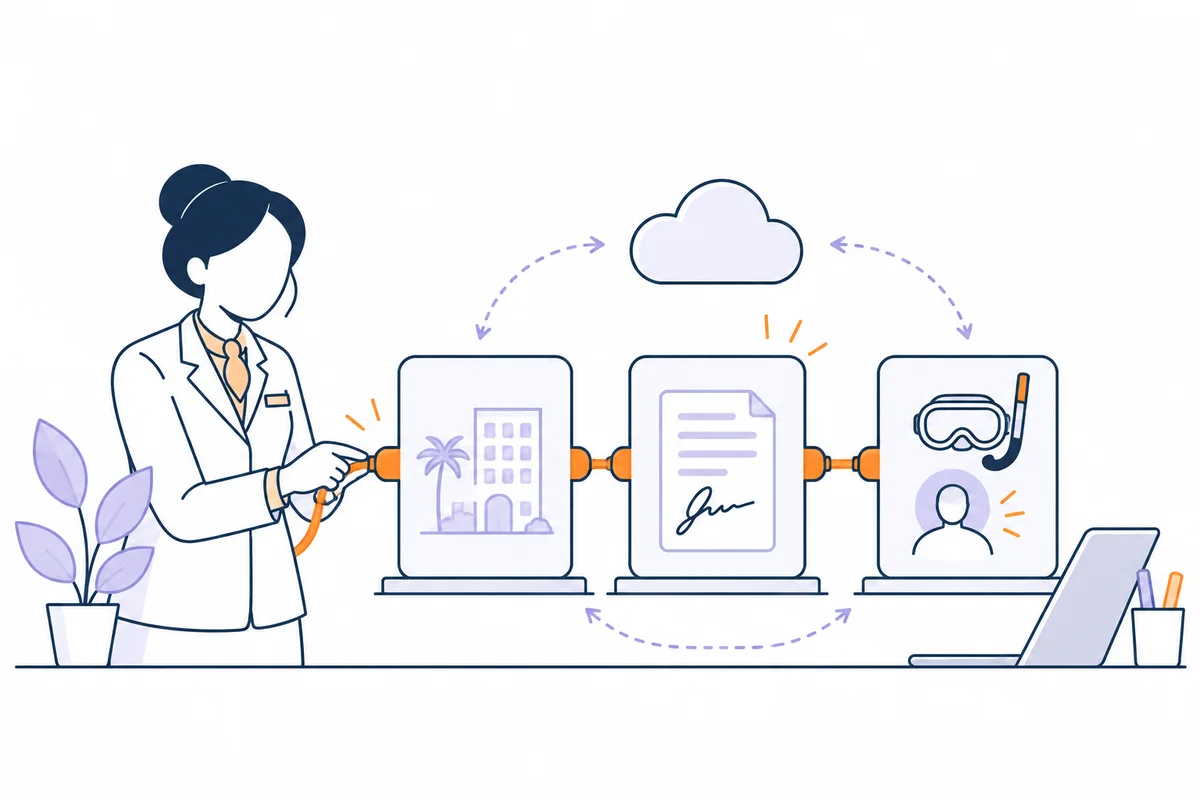
Bring document completion and signing into your workflow. Connect Signature to FastReply check-in, AquaDivePro customer records or explore an API integration with your management software.
Signature also works independently. Connections are configured with support.
CHOOSE YOUR PATH
Signature collects data and on-screen signatures and stores the document. The connected software uses the information according to the features of the active integration.
For accommodation providers who want to collect consent during online check-in and find it in the guest record.
Connection available; configuration required.
Check-in and consent →For diving centres who want to use customer data in documents and transfer the information collected back to their management software.
Connection available; configuration required.
Diving data and documents →For businesses and software partners who want to explore exchanging data with Signature through dedicated APIs.
Feasibility assessment and development on request.
API possibilities →FASTREPLY / HOSPITALITY
FastReply is the hospitality suite that includes Signature. Connecting the two products brings the FastPrivacy form into online check-in: guests read the accommodation provider’s texts, make their choices and sign on screen.
Configure the connection and create FastPrivacy with introductory text and consent items.
Completes the form during online check-in. The signature accompanies the choices made, without automatically agreeing to every purpose.
Generates the signed PDF, associates it with the customer and returns the consent outcomes and the document reference.
Consent choices update the guest record in the CRM. Active interfaces update data in the PMS according to the available connection.
The accommodation provider prepares the texts in line with its own purposes and privacy notice.
AN EXAMPLE AT RECEPTION
The team checks the choice in the CRM record and finds the signed document in Signature. The signed FastPrivacy form uses one credit, even when it includes three consent items.
FastPrivacy requires an account connected to FastReply. Opening the PDF reference requires access to Signature. Compatibility and data transferred to the PMS must be checked for the accommodation provider.
Explore the complete hospitality and rental workflow →AQUADIVEPRO / DIVING CENTRES
AquaDivePro is Infoelba’s cloud management software for diving centres. Signature handles form completion, on-screen signing and document storage: the connection lets you use existing customer data and synchronise the information collected.
A DIVER RETURNS TO THE CENTRE
Reception starts from the customer record in AquaDivePro and sends the document for completion. The participant adds the required data and signs; the team finds the information and documents in the connected workflow. The diving centre remains responsible for checking diving requirements.
Activating the connection requires a Signature account and configuration with support. Signing credits are separate from the AquaDivePro plan. Signature’s Boat Sheet and AquaDivePro’s operational features follow separate workflows and terms.
API / CONNECTIONS ON REQUEST
APIs are interfaces through which two software systems exchange information. They let us explore a workflow between Signature and the management software you already use, defining which data is transferred and when.
APIs do not imply automatic compatibility with every management system. Feasibility, exchanged fields, development, timescales and terms are assessed for the requested connection.
A CONNECTION ALREADY FEATURED
A travel agency connected its management software to Signature for short-term rental contracts. Booking data populates the document; after signing, the result returns to the management software.
This is an example of a dedicated integration, separate from the FastPrivacy workflow within FastReply check-in.
Read the travel agency case study →WHAT IF YOU DON’T HAVE MANAGEMENT SOFTWARE?
Create the document, share the link by email or WhatsApp, or display a QR code. The customer completes and signs it; you find the PDF and data in the archive.
Find a sample document →Discover how it works →FROM DISCUSSION TO CONNECTION
Tell us which software, documents, recipients and steps you want to connect.
For FastReply and AquaDivePro, we agree the configuration; for other software, we assess a dedicated integration.
Define the texts and fields and agree a workflow check, from the initial data to the signed document.
Align operators on the activated features, access permissions and checks to carry out in their daily work.
Each signed document uses one Signature credit. Packages have no subscription or expiry date; services from other products and dedicated development have separate terms.
View Signature packages and credits →ANSWERS BEFORE YOU CONNECT
Understand each product’s role and choose the right workflow for your business.
No. Signature works independently to create, send, complete and sign documents and view them in the archive. Connections are additional options.
Signature is a product within the FastReply hospitality suite. It can also be used independently in other sectors. Connecting it to FastReply check-in adds the FastPrivacy workflow for guest consent.
The FastPrivacy form collects choices on the items prepared by the accommodation provider: data processing, marketing communications and third-party sharing. The outcomes update the guest record; signing does not mean automatically agreeing to every purpose.
Guest data is transferred through active interfaces. Compatibility, fields and features depend on the PMS and connection used: these must be checked with the team.
Signature stores the signed document and returns the PDF reference to FastReply together with the consent outcomes. You need to log in to Signature to open that reference.
Customer data already in AquaDivePro can prefill the document. The information collected returns to the management software, where you can view the document list and signed documents for each customer.
Signature credits are separate from the AquaDivePro plan. Each signed document uses one Signature credit. Downloading Signature’s Boat Sheet uses two credits per download.
Tell the team the name of your software and the workflow you want. API integrations for other management systems are assessed and activated on request; there is no automatic compatibility with every system.
Yes. Describe the system, the documents to manage and the data to exchange. The team assesses the workflow and shares the technical information needed to define the integration.
The terms depend on the connected product and the work required. For configuration or dedicated development, the team first needs to understand the software, data and desired workflow. Signature credit prices are available on the Pricing page.
TELL US ABOUT YOUR WORKFLOW
Tell us about your management software, the data already available and what you want to find after signing. We use this information to assess the connection.
Write to the teamTo configure FastReply or AquaDivePro and explore dedicated APIs.
+39 0565 918864info@fastreplysignature.itTry Signature on its own ↗Welcoming hotel guests: discover the smartphone privacy document case study.